

How to Harness the Power of AI Design for Your Next T-Shirt Project


How to Harness the Power of AI Design for Your Next T-Shirt Project
AI design tools are everywhere right now — and when used well, they can be an incredibly powerful way to jump-start creativity, explore ideas faster, and unlock new directions for your apparel.
But here’s the key:
AI works best when it supports your creativity — not when it replaces it.
If you’re thinking about using AI for your next t-shirt or merch project, these three simple rules will help you get better results while staying true to your brand, your message, and your original ideas.
Rule #1: Make a Plan
Start With a Clear Concept
Before you type a single prompt, take a step back and decide what you’re actually trying to communicate.
Ask yourself:
- Are you promoting your business or a new product?
- Celebrating a grand opening, anniversary, or event?
- Creating merch just for fun, culture, or community?
Once you know the goal, think about how that idea should be communicated visually.
What will be memorable? What will grab attention? What will make someone want to wear it?
That core idea becomes your concept — and it’s the foundation everything else builds on.
Rule #2: Choose a Style
Give AI a Creative Roadmap
AI needs direction. Choosing a clear style gives it a framework to work within.
For example:
-
vintage 1970s concert tee feel
-
collegiate / bowl game merch aesthetic
-
clean, modern brand mark
-
gritty, hand-drawn Austin vibe
Once you choose a style, you’ve given AI a road map — and the results become far more usable and on-brand.
Style doesn’t limit creativity.
It actually focuses it.

Rule #3: Be Specific
Details Matter (A Lot)
AI models are extremely literal. They do exactly what you ask — nothing more, nothing less.
The more specific you are, the better your results will be.
Think in production-friendly terms, like:
- Clean, crisp vector style for screen printing
- No more than three ink colors on a black background
- Muted color palette with plenty of negative space
These details help ensure your design isn’t just cool — it’s actually printable, wearable, and effective.
Putting It All Together: A Sample Prompt
Now that you have:
- A concept
- A style
- And clear specifics
You can combine everything into a strong, usable prompt like this:
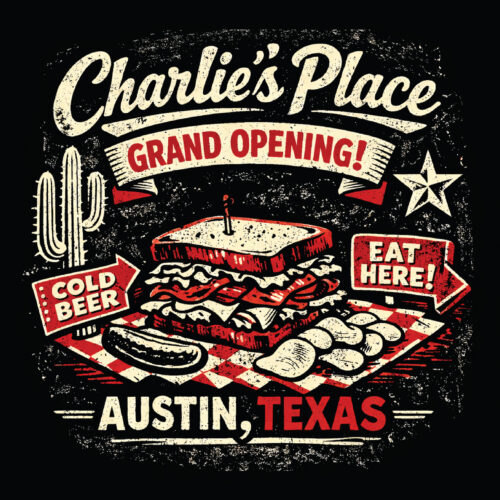
“Design a grungy, vintage-style illustration for ‘Charlie’s Place’ grand opening. Incorporate bold, distressed vector lines capturing a gritty, laid-back Austin, Texas vibe. Include elements like a classic sandwich or deli items, vintage signage, or Texas motifs such as a star or cactus. Use only two ink colors that pop against a black tee, emphasizing a worn, retro feel perfect for screen printing.”
This is where AI really shines — not as a shortcut, but as a creative amplifier.
(images below were actually created from this prompt in Nano Banana Pro 4K and ChatGPT Image 1.5 HD)

If you remember nothing else, remember this:
- AI doesn’t replace creativity — it responds to it
- Strong concepts always outperform vague ideas
- Style + specificity = better, more printable designs
Used thoughtfully, AI can help you explore more ideas faster — while still keeping your brand, message, and craftsmanship front and center.
Ready to Create Your Next Great Design?
If you’re experimenting with AI design or just starting to explore what’s possible, we’d love to help you turn those ideas into apparel that actually works in the real world.
-
Reply to this email to start a conversation
-
Call us to walk through options 512-454-6249
-
Stop by the shop and see samples in person 8613 Cross Park Dr. Austin, TX 78754
Austin Screen Printing & Austin Embroidery
Proudly serving Austin since 1975
Smart tools. Thoughtful design. Built to last.